August 18th, 2025
New

Hello everyone!
We have two major updates to share today that are all about making you faster, more focused, and more in control of your schedule. We're thrilled to introduce a game-changing integration with Apple Shortcuts and a much-requested improvement to our Filter tool!
β
Create Tasks in an Instant: Capture ideas on the fly without ever opening the app.
π
Apply Day Templates: Set up your entire day's routine (like your "Monday Morning Focus" or "Weekend Reset") in seconds.
π Move Tasks in Bulk: Clean up your schedule, move overdue items, or archive tasks with a powerful, one-tap automation.
π View Your Agenda: Get a quick glance at what's on your plate for any day, perfect for widgets and quick checks.
This is more than just a new feature; it's a new way to build a faster, smarter, and more personalized planning system that works for you.
Ready to build your first automation? Update PolyPlan on the App Store today and check out our full guide to get started.
Read the Full Guide to PolyPlan Shortcuts Here
Sometimes, you need to cut through the noise. Based on your feedback, we've added a powerful new option to our Filter tool.
You can now filter your schedule to see only the tasks you have created natively in PolyPlan.
This is perfect for moments when you want to declutter your view from synced calendar events and tasks from other apps. It provides a clean, focused list of your original to-dos, making it easier than ever to see what you need to accomplish.
Both of these new features are available now. Update your PolyPlan app from the App Store to get started. We can't wait to see how these updates improve your workflow!
Happy planning,
The PolyPlan Team
June 6th, 2025
Improved

We're excited to announce the latest update to PolyPlan for iOS! Version 12.0.0 introduces enhanced task management capabilities that make your workflow smoother and more intuitive.
Task Details Screen: Access comprehensive information about your integrated tasks with our brand-new dedicated details view. The interface has been thoughtfully designed with a clean, organized layout that puts the information you need front and center.
Quick Action Buttons: Take immediate action with convenient buttons right within the task details. Mark your progress instantly with the check-in button, or jump directly to the task in its source application using the view original button for full context.
This update streamlines your task management experience, giving you better visibility and control over your integrated workflows.
Download PolyPlan 12.0.0 today from the App Store and experience the improved task management capabilities.
May 19th, 2025
New
Improved

We're thrilled to announce several major updates to PolyPlan that significantly enhance your productivity experience across all platforms. These new features reflect our ongoing commitment to creating a seamless, integrated productivity ecosystem that adapts to your workflow.
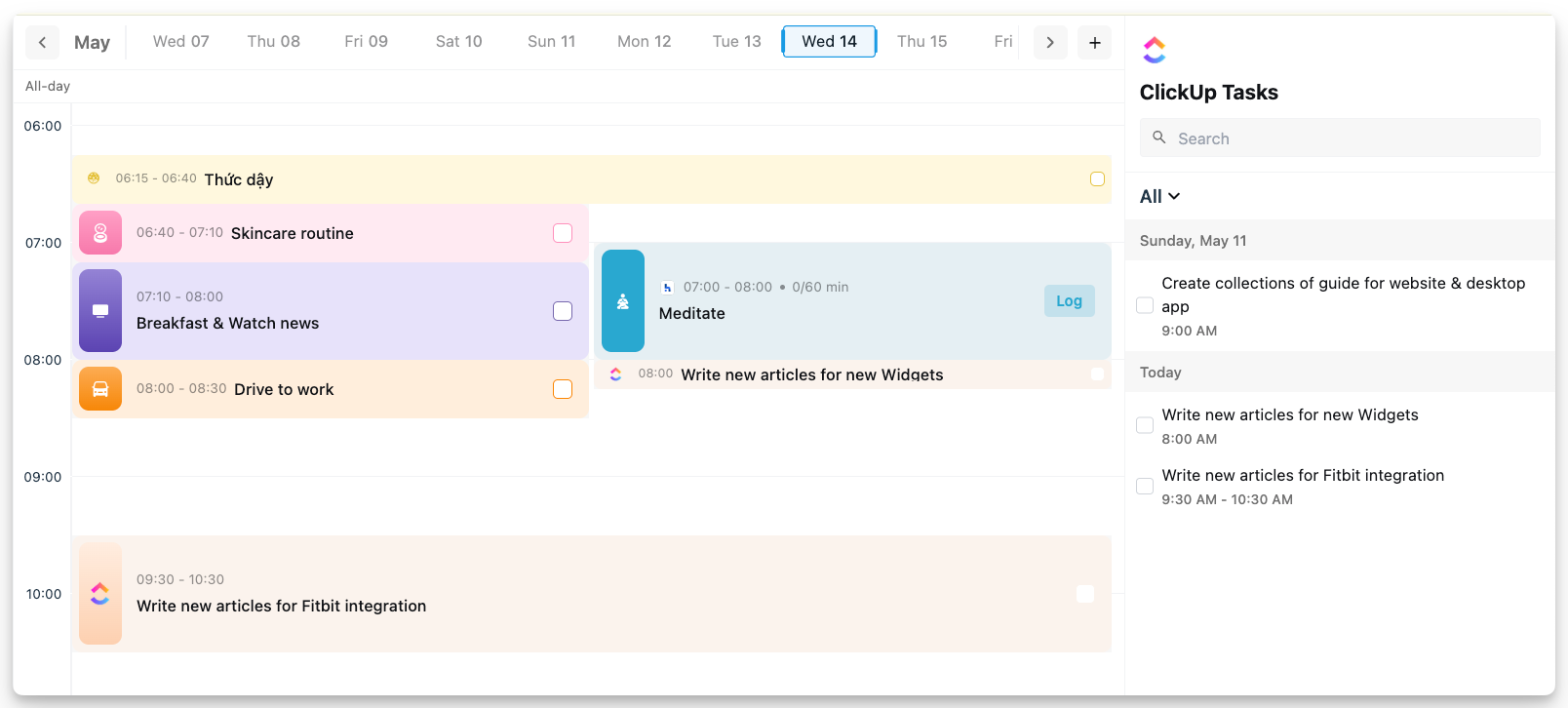
We're excited to unveil our new ClickUp integration, now available on both our desktop & iOS app. This powerful addition allows you to:
Seamlessly sync tasks from ClickUp directly to PolyPlan
Maintain a single source of truth for all your project management needs
Automatically update task status across both platforms
Organize ClickUp tasks within PolyPlan's intuitive interface
This integration represents a significant step forward in our mission to create a unified productivity environment.

We've completely revamped our keyboard shortcut system on the website and desktop app, putting more productivity power at your fingertips.
The enhanced keyboard shortcuts allow you to:
Navigate through the application with unprecedented speed
Create, edit, and organize tasks without touching your mouse
Access advanced features through intuitive key combinations
See our keyboard shortcuts documentation in the Help Center.
Following the successful launch of our Habitify integration on the website and desktop app, we're delighted to announce that this feature is now available on the iOS app as well.
The iOS integration provides the same comprehensive habit tracking capabilities as our desktop version, ensuring consistency across all your devices.
Whether you're at your desk or on the go, your habits remain an integral part of your productivity system.
Update now and experience a more connected, efficient task management workflow!
Access website app: https://use.polyplan.app
Access phone app:
Access desktop app
For any questions, please feel free to share with us at contact@polyplan.app
April 18th, 2025
New

PolyPlan has just launched two game-changing features alongside several interface improvements that take your productivity management to the next level. Let's dive into what's new.
The long-awaited Habitify integration has finally arrived on website & desktop apps! As the #1 most requested feature from our community, this powerful connection bridges the gap between your daily habits and task management.
Seamless Habit Syncing: Your Habitify habits automatically appear in your timeline on PolyPlan.
Direct Check-ins: Complete check-ins on your habits without leaving PolyPlan.
Holistic Productivity System: See habits alongside tasks, meetings, and events in one place; manage both your routine habits and one-off tasks in a single workflow
Read the guide π PolyPlan - Habitify Integration
Note: currently this integration is available on website & desktop apps.

Maintaining concentration in a distracted world is challenging. Our new Focus Sessions feature helps you dedicate time to your most important tasks with built-in time tracking.
Countdown Timer: Start a focused work session on any task
Flexible Control: Pause or stop your session if interruptions occur
Duration Tracking: Automatically update task durations based on actual time spent
Productivity Insights: Build awareness of how you're allocating your time
Whether you practice Pomodoro, time-blocking, or simply need to track time spent on tasks, Focus Sessions seamlessly integrate deep work principles into your PolyPlan workflow.
Learn more about using Focus on website & desktop apps π Focus Session: Live Timer
Note: currently this integration is available on website & desktop apps.

The week view has been redesigned into a new date bar for easier navigation on website & desktop apps:
Quickly scroll through dates to view specific days
Drag to select multiple days for a broader schedule overview
Get clearer visibility into your upcoming commitments

The mobile experience for iOS users continues to improve with two significant updates:
Create and save personalized task views based on status, color, and integration
Add new tasks to existing day templates without starting from scratch
Update now and experience a more connected, efficient task management workflow!
Access website app: https://use.polyplan.app
Access phone app:
Access desktop app
For any questions, please feel free to share with us at contact@polyplan.app
March 28th, 2025
New
Improved

We're excited to announce a significant update to PolyPlan that brings powerful new features and improvements to streamline your productivity:
Connect your PolyPlan workspace directly with Trello, enabling seamless task management across platforms. Now you can easily sync your tasks, boards, and workflows between PolyPlan and Trello, giving you more flexibility in how you track and organize your work.
Read the guide to integrate your Trello board to PolyPlan: Trello integration guide
Trello integration is released on Website app and iOS first. It is on the way delivered to Android.

We've expanded our Live Activities feature! Previously limited to tasks created within PolyPlan, you can now enjoy Live Activities for tasks imported from integrations. Stay updated on your task progress at a glance, right from your device's home screen.
Limitation: Live activites feature is only working on the task with specific duration (the task must have start time and end time)
Smoother item selection and dragging
More intuitive interactions when managing tasks in multiple views
Refined behavior to make task management more fluid and responsive
Two-way sync now fully supports recurring tasks
Fixed an issue where completing a synced task from Todoist would inadvertently remove its repetitive task
More reliable and consistent task synchronization
Update now and experience a more connected, efficient task management workflow!
Access website app: https://use.polyplan.app
Access phone app:
For any questions, please feel free to share with us at contact@polyplan.app
March 5th, 2025
New
Improved
Fixed

We're excited to bring you the brand-new Notion integration, and share some fantastic new features and improvements that will make your planning experience even more powerful and intuitive!
PolyPlan now seamlessly integrates with Notion, allowing you to synchronize items from your Notion databases directly into PolyPlan.
Read our comprehensive how-to guide here: Notion integration.

We've enhanced the note-taking experience with rich text capabilities. You can now:
emphasize important information with bold, italic, and underlined text formatting
create organized bullet lists for clearer structure,
watch as URLs automatically transform into clickable hyperlinks.
This is expected to make your notes more readable, navigable, and professional.

We've made recurring schedules easier to manage. Now you can take your perfectly planned day and save it as a day template with just a few clicks.
Also, you now can manually apply a day template to several days of the week at once!
Update how to do those in this: Day Template on Website app

In this new Android app version, we made a major upgrade with new customization options and productivity-enhancing features, including:
Ability to set accent color: Personalize your PolyPlan experience by choosing your preferred accent color throughout the app.
Create custom filter view to filter tasks & events: Filter by status to focus on what needs attention, by integration source to see only items from certain connected apps, or by the colors you've assigned to tasks created directly in PolyPlan.
Addition of the compass view: See your week, month, and year all together in a cohesive overview that helps you balance short-term tasks with long-term goals and commitments.
"Shake to undo": Made a mistake? Simply shake your device to instantly undo your last action.
iOS users, we've also got some treats for you:
Any days as your first day of the week: We understand that different people plan their weeks differently. Now iOS users can customize which day appears first in their weekly views, making planning more intuitive to your personal preferences.
Improved live activities: We've resolved previous problems with the live activities feature, ensuring that your current activities display correctly and update in real-time.
Update now and experience the new PolyPlan β where productivity meets simplicity! β¨
Access website app: https://use.polyplan.app
Access phone app:
For any questions, please feel free to share with us at contact@polyplan.app
February 19th, 2025
New

We're thrilled to introduce AI Planning with Smart Parse β a powerful new way to turn your words into tasks.
Powered by OpenAI, this feature transforms how you plan your day in PolyPlan.Just tell PolyPlan what you want to do and when.
Our AI will handle the rest, creating perfectly scheduled tasks in your timeline view.
For the best AI Planning results, include specific time ranges for your activities β our AI loves clarity as much as you do! β°

From version 2.0.5 of the Android app, we have added widgets that allow you to keep your plans visible and accessible right from your home screen.
Choose the widget that matches your planning style and customize your home screen for maximum productivity.

Also in version 2.0.5 of the Android app, staying on schedule just got easier with our new Live Activities feature for Android. Here's what you can do:
Automatic timer launch when tasks begin
Real-time progress tracking
Optional auto-completion when time's up
Smart notifications to keep you on track
Perfect for time-blocking and focused work sessions β let PolyPlan handle the timing while you focus on what matters.

Ready to experience the future of planning? Update your PolyPlan app now! π
Happy Planning! π―
Access website app: https://use.polyplan.app
Access phone app:
For any questions, please feel free to share with us at contact@polyplan.app
January 20th, 2025
New

We're thrilled to announce that PolyPlan has arrived on Windows, bringing the full power of our productivity platform directly to your desktop!
The complete PolyPlan experience is now on your PC!
Transform your Windows PC into a productivity powerhouse with the native PolyPlan app. Experience the same comprehensive planning and organization tools you love from our web version, now optimized for your desktop environment.
Complete integration with multiple apps
Real-time synchronization with devices
Native Windows notifications
Offline access to your plans and tasks
Enhanced performance and responsiveness
Familiar interface designed for Windows users
Ready to elevate your planning experience? Download PolyPlan now from the Microsoft Store and take control of your daily planning right from your desktop.
Download PolyPlan from the Microsoft Store
Make every day more productive with PolyPlan for Windows β your trusted planning companion, now closer than ever.
January 15th, 2025
Important Change

We want to share an important update about our Things integration. After careful consideration, we've made the decision to remove this feature from PolyPlan Desktop.
We discovered some challenges in communication and in how data is managed between our applications. To ensure you have the best possible experience, we believe this change is necessary.
We know many of you use this integration in your daily workflow, and we didn't make this decision lightly. Your smooth experience with both platforms matters most to us. We highly appreciate your understanding for us!
January 9th, 2025
New

We're excited to unveil Compass View, your new strategic planning companion. This powerful feature helps you align your daily actions with your bigger goals.
Think of it as your navigator through time. Start with your yearly vision, break it down into monthly milestones, and transform those into actionable weekly tasks.
Want to understand the "why" behind each task? Compass view lets you trace any task back to its larger purpose, helping you stay motivated and aligned with your goals.

We're thrilled to introduce a powerful new way to find your tasks! Our new search tool lets you explore your entire task history with ease.
Click Search or press Ctrl + F, and you can search by the task name, or by specific date or month.
Looking for something from months ago? No problem! Search through any date range you need, without limitations. Finding your tasks has never been this simple.

We've reimagined how you view and organize your tasks. Our new filter system lets you control exactly what you see.
Do you want to focus on tasks with a specific status, or would you like to see items from particular integrated apps? Our new filters make it effortless.

We're still working on filters for tasks created directly in PolyPlan β stay tuned for this feature in an upcoming update!
Your thoughts and suggestions help shape PolyPlan Desktop. We'd love to hear about your experience with these new features!
Connect with us through our feedback portal or support channels. Together, we're making PolyPlan better every day.